
Thermostat Wiring Colors Explained: R, W, Y, G, C, and More
November 19, 2026
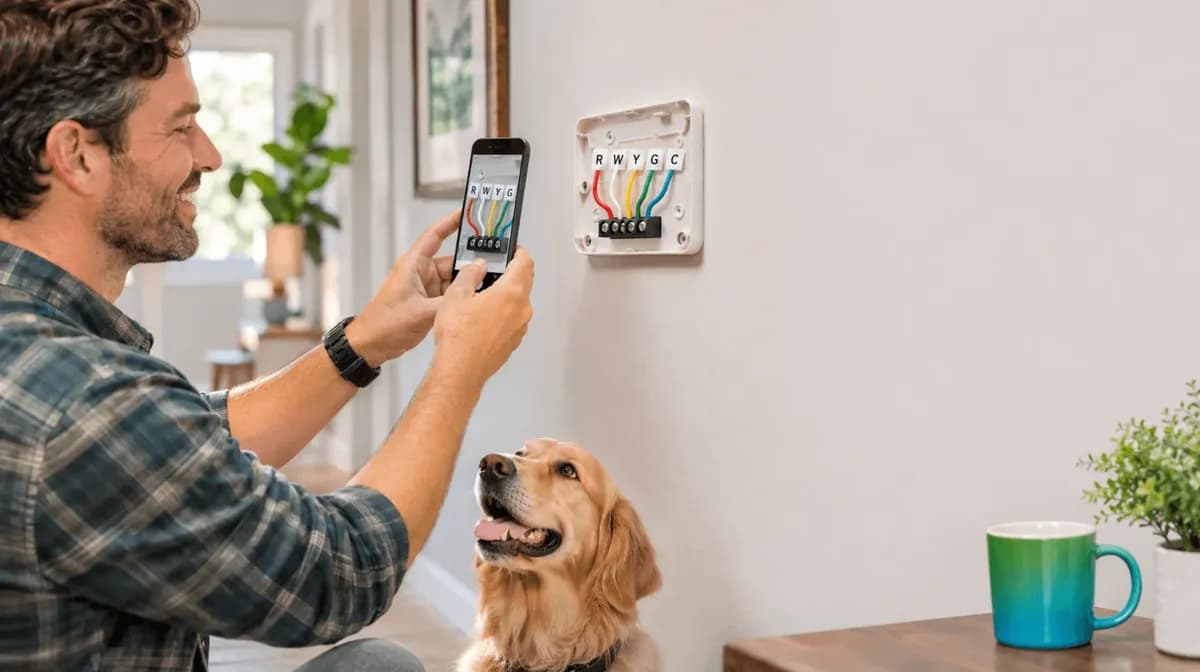
Most thermostat wires follow a common color code: red (R) for 24V power, white (W) for heat, yellow (Y) for cooling, green (G) for the fan, and blue or black (C) for the common wire. Installers don't always follow it, so go by the terminal letter each wire is attached to, not its color.
Upgrading to a smart thermostat? Count your wires first. Many Wi-Fi models need a C wire, and four wires usually means you don't have one yet.
Turn off power at the breaker before you touch anything. Then use the chart below, take the quick smart thermostat quiz, or shop air filters at Filterbuy.
Thermostat wire color chart
Read the letter, not the color
The letter on the terminal tells you what the wire does. The color is only a common habit.
Usual color · Terminal · What it does
24V power from the transformer
Separate power for heating and cooling, often joined by a jumper
Common wire: constant power to the thermostat
Many smart thermostats need this one
Calls for heat (first stage)
Second-stage, auxiliary, or emergency heat
Calls for cooling by starting the compressor
Second-stage cooling
Turns on the indoor blower fan
This fan pulls air through your filter
Heat pump reversing valve, on in cooling
Heat pump reversing valve, on in heating (some systems)
Combined Y and G signal, used with C-wire adapters
Count your wires
What your wire count usually means
2
R + W: heat only
3
R + W + G: heat and fan, no central AC
4
R + W + Y + G: heat, cooling, and fan. No C wire.
5
Adds C: ready for most smart thermostats
6–8
Usually a heat pump or multi-stage system
Don't count jumpers. No C wire? An unused wire in the wall, a C-wire adapter, or a new cable can fix it.
Colors don't match the chart?
That's common. Photograph the wiring and label each wire by its terminal letter before you disconnect it.
Safety first
Turn off power at the breaker. Thick wires joined with wire nuts or a 120V/240V label mean stop and call a licensed electrician.
Know your wires? Find the smart thermostat that fits them.
Answer a few quick questions to see which smart thermostat setup works with your system.
A new thermostat can run your fan more often. Note the filter size on your filter's frame before you start.
TL;DR
Thermostat wiring colors usually follow the same code. Red (R) carries 24-volt power, white (W) calls for heat, yellow (Y) calls for cooling, green (G) runs the blower fan, and blue or black (C) is the common wire. Installers don’t always follow it, though, so go by each wire’s terminal letter rather than its color. Because Filterbuy makes air filters, this guide also gives extra attention to G, the fan wire.
Key Takeaways
The terminal letter is the truth. Trust the letter stamped beside the screw, since installers sometimes use any color.
Heat pumps add O or B. These control the reversing valve, the part that switches a heat pump between heating and cooling. O switches it in cooling, B in heating.
Thick wires mean line voltage. Heavy wires joined with wire nuts usually carry 120V or 240V, and the color code doesn’t apply.
Why a Filter Maker Cares About Thermostat Wires
Your thermostat decides when the blower runs, and the blower decides how much air reaches your filter. Filterbuy filters are cut, pleated, and framed to order in our own U.S. plants, so airflow is where our attention goes.
Thermostat Wire Color Code and Terminal Letters Chart
Here are the colors most installers use on 24V systems and what each terminal does.
Wire colors are a common convention, not a code requirement. Always confirm each wire by its terminal letter.
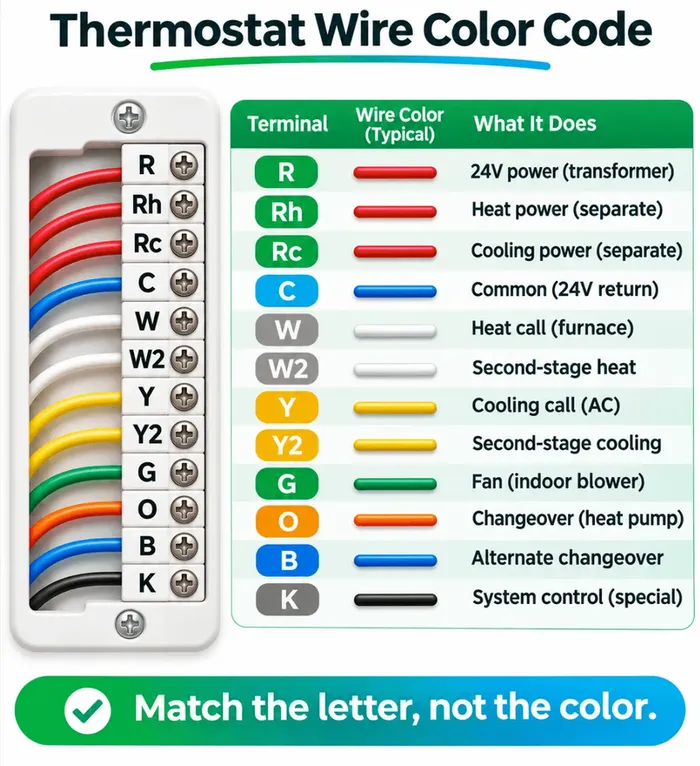
What Does Each Thermostat Wire Do?
Each thermostat wire carries one signal. R brings 24V power, C keeps the thermostat powered, W calls for heat, Y calls for cooling, G runs the fan, and O or B switches a heat pump between modes.
R (red), the power wire. R is the “hot” side of the 24V circuit. Some thermostats split it into Rh for heating and Rc for cooling.
C (blue or black), the common wire. The C wire completes the circuit so the thermostat has constant power. As Google’s Nest support team points out, the C wire doesn’t control heating or cooling. Many Wi-Fi models need one.
W and Y (white and yellow), heat and cooling. W tells a furnace or boiler to start heating, while heat pumps use W2, AUX, or E for backup heat. Y starts the outdoor compressor, and Y2 adds a second cooling stage.
G (green), the fan wire. G turns on the indoor blower that moves air through your ducts and your HVAC air filter.
O and B (orange and dark blue), the heat pump wires. These control the reversing valve that switches a heat pump between heating and cooling. Installer documentation from Resideo, the company behind Honeywell Home thermostats, describes O as energized in cooling and B in heating. See Filterbuy’s guide to how heat pump HVAC systems work.
Why Your Wire Colors Might Not Match the Code
No code requires installers to use these colors, so plenty of homes don’t. That’s why Google’s Nest compatibility guide tells homeowners to ignore wire colors and go by terminal labels. Common mismatches include:
A blue wire on R or a red wire on C. The installer grabbed whatever was handy.
A dark blue wire on B. Some older systems used B as the common wire rather than a heat pump valve wire.
Unused wires folded into the wall. One of these spares may work as a C wire.
Numbered terminals (1, 2, 3 or A, B, C). These often point to a brand-specific system, and Google’s guide to identifying thermostat wires says many of them won’t work with Nest thermostats.
With the power off, check where each color lands on the control board inside your furnace or air handler (the indoor fan unit). That letter tells you what the wire does.
How Many Thermostat Wires Do You Have?
Your wire count tells you what kind of system you likely have. Count the wires coming out of the wall, and leave jumpers (short links between terminals) out of the count.
Count only the wires coming out of the wall, not jumpers between terminals.
Four-wire homes may need a C-wire fix, depending on the thermostat. Google says Nest thermostats often don’t need a C wire, while other smart models do. Filterbuy’s smart thermostat resources have more setup tips.
How to Label Thermostat Wires Safely
Work through these steps before you disconnect a single wire.
Turn off power at the breaker. Switch off the breaker for your furnace or air handler, plus the outdoor unit if it’s separate.
Confirm the power is off. Change the setting by at least 5 degrees and wait a few minutes. Google’s Nest support recommends this same test.
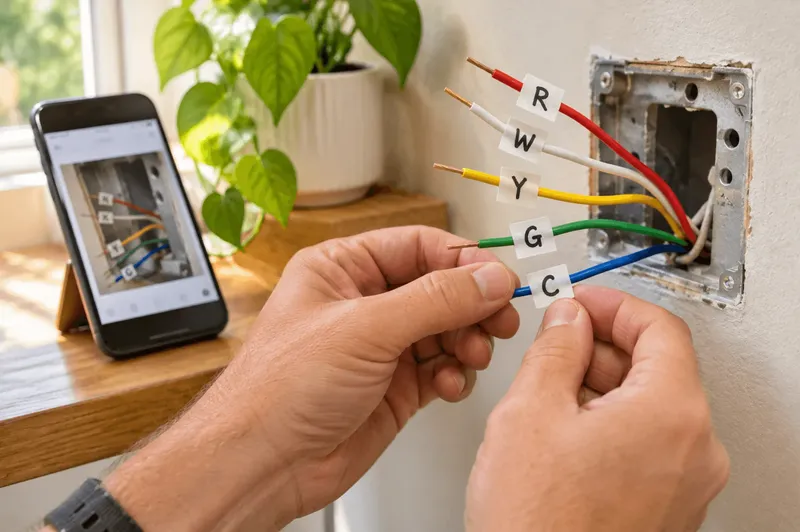
Photograph the wiring. Make every terminal letter and wire color readable.
Label each wire by terminal letter. Wrap painter’s tape around each wire and write its letter. If a terminal has two labels, like W-O/B, write both, as Honeywell Home advises.
Note any jumper. Write down whether a jumper joins R and Rc, but don’t count it as a wire.
Call a pro when in doubt. Two C wires or separate O and B wires are good reasons to bring in a licensed HVAC technician, and so are unlabeled terminals.
Filterbuy pro tip: While the furnace panel is open, pull your air filter and photograph the size printed on its frame. Keep it with your wiring photo.
After the Swap: Which Wire Is Causing That Problem?
If something isn’t working after the swap, the cause often traces back to one terminal. Find your symptom, then check that wire with the breaker off.
Turn off power at the breaker before reseating any wire. If the problem continues, call a licensed HVAC technician.
If the wiring checks out but the heat pump runs backward, the thermostat’s O/B setting probably doesn’t match your system. Resideo’s installer guide lists this as a setup option.
Low-Voltage vs. Line-Voltage Thermostats
Everything above applies to low-voltage (24V) thermostats used with furnaces and heat pumps. Line-voltage thermostats run on 120 or 240 volts, usually for baseboard heat, and carry a real shock risk.
If you see thick wires or a high-voltage label, stop and call a licensed electrician.
Honeywell Home notes that a low-voltage thermostat won’t work on a 120V or 240V system. If you see thick wires or a high-voltage label, stop and call a licensed electrician.
A Note From Filterbuy
“I work directly with our manufacturing team, so I’ve learned to look at every HVAC question through airflow. To me, a thermostat swap changes how air moves through the house. My rule is simple: trust the letter, not the color. And before you close the furnace panel, pull your filter and take a look.”
Michelle Wan, Brand Manager & Air Quality Writer, Filterbuy
Expert review: This guide was reviewed by David Clark, Licensed HVAC Technician.
Why the G Wire Is Your Filter’s Wire
After any thermostat swap, the Filterbuy team suggests three quick checks:
Test the fan. Set the fan to On. If no air moves at the vents, check the G wire at both ends.
Review your new fan settings. Many smart thermostats add Circulate or fan schedules. More fan time means more filtering and a filter that fills faster. Filterbuy customers tell us switching to fan On changes their filter schedule, as our guide to running your furnace fan on or auto explains.
Reset your filter routine. Check your filter monthly for the first few months. Heat pump owners can also read Filterbuy’s guide to everything you need to know about heat pump filters.
Ready to find your filter? Your size is printed on the frame of the filter you have now. Find your filter size at Filterbuy from over 600 standard sizes. If yours isn’t listed, we cut custom sizes to the eighth of an inch. Then set up Auto Delivery so a fresh filter arrives on schedule.
Supporting Statistics
U.S. government data shows how many homes this guide applies to:
About 1 in 10 homes had a smart thermostat in 2020.
12.8 million of 123.5 million U.S. homes had a smart or internet-connected thermostat.
Source: EIA RECS 2020, Table HC6.1
13% of homes heated with a central heat pump in 2020.
16.1 million homes used one as their main heat.
Electrical distribution equipment caused about 19,900 home fires a year (2015–2017).
These fires averaged 210 deaths and 600 injuries a year.
Thermostat Wiring FAQs
Do I Have to Match Wire Colors When Installing a New Thermostat?
No. Move each wire to the terminal with the same letter it had on your old thermostat, whatever its color.
What Do the Thermostat Terminal Letters Mean?
Each letter names the wire’s job. R is power, C is common, W is heat, Y is cooling, G is the fan, and O or B controls a heat pump’s reversing valve. A number after a letter, as in W2 or Y2, means a second stage.
What Is the Blue Wire on a Thermostat?
A blue wire is usually the C (common) wire, which supplies constant 24V power. On some heat pumps, a dark blue wire goes to B instead.
What If I Don’t Have a C Wire?
Look for an unused wire tucked into the wall. If it’s free at both ends, it can often serve as C. If not, a C-wire adapter or power accessory can supply power, or a technician can run new cable.
Is It Safe to Change My Own Thermostat Wiring?
Yes, for most low-voltage thermostats, as long as the breaker is off and every wire is labeled. Call a licensed professional for line-voltage thermostats or work inside the furnace.
Glossary
24V (24 volts AC): The low voltage that runs most central HVAC thermostats, supplied by a transformer in your HVAC equipment.
C wire (common wire): The return side of the 24V circuit that keeps the thermostat powered.
Control board: The circuit board in a furnace or air handler where thermostat wires connect.
Jumper: A small clip or short wire joining two terminals, usually Rh and Rc, on single-transformer systems.
Line-voltage thermostat: A thermostat that switches 120V or 240V power directly, as with baseboard heat.
O/B terminal: The heat pump terminal that controls the reversing valve. O energizes it in cooling, B in heating.
Reversing valve: The heat pump part that switches refrigerant flow between heating and cooling.
Filterbuy is not affiliated with or endorsed by Google, Honeywell Home, or Resideo.