
Why Your Thermostat Reads the Wrong Temperature (and How to Fix It)
November 19, 2026
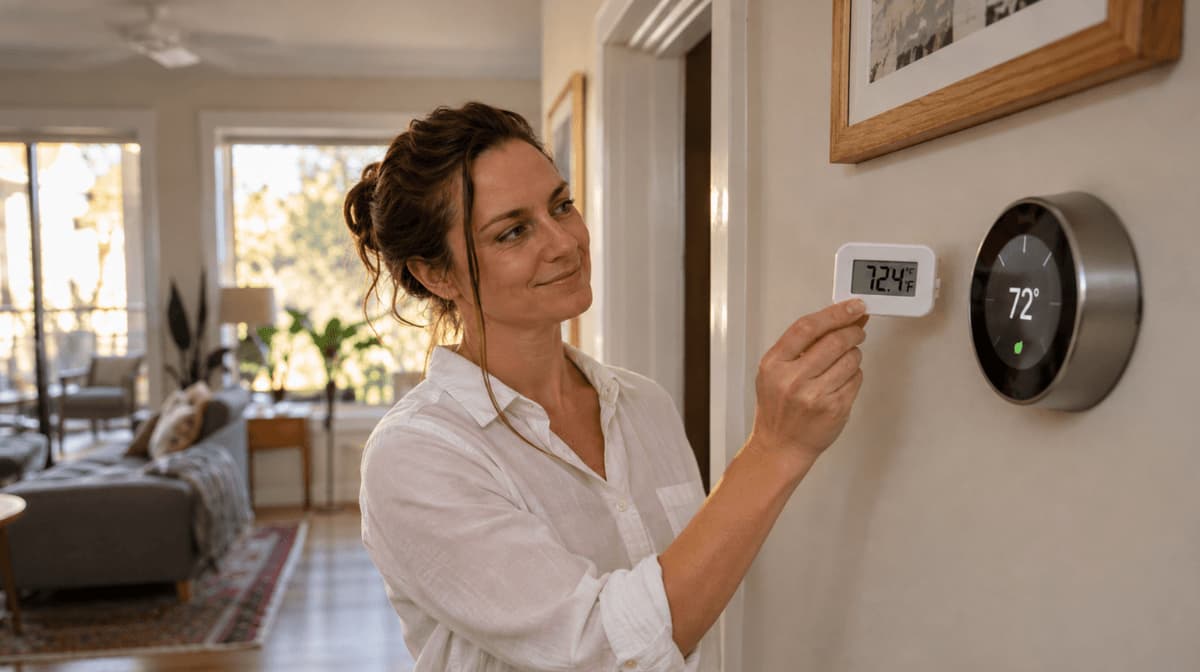
Most of the time, a nearby heat or cold source is fooling the sensor: direct sun, a lamp, a supply vent, an exterior wall, or a draft through the wire hole. To find out, compare your thermostat with a separate thermometer over a day.
A steady gap of 2°F or more can be corrected with an offset. A gap that changes through the day means you need to seal a draft or move the thermostat.
Reading fine, but rooms still feel warm or lag behind the setpoint? A clogged air filter can be part of it. Take the quick filter match quiz below, or shop air filters at Filterbuy.
The one-day accuracy test
Steady gap or drifting gap? Your fix depends on which one you see.
STEP 1 · COMPARE
Set a separate thermometer right next to your thermostat. Check both readings several times over one day.
Thermostat
72°
Thermometer
70°
Example reading: a 2°F gap
STEP 2 · IF THE GAP STAYS STEADY
Off by 2°F or more, all day long
The sensor is consistently off.
Fix: Set a temperature offset
STEP 2 · IF THE GAP DRIFTS
Gap changes through the day
Something nearby is heating or cooling the sensor.
Fix: Seal the draft or relocate
Common culprits and what they do to the reading
Direct sunlight
Reads high in the afternoon
Lamp, TV, or electronics
Reads high while they're on
Supply vent airflow
Swings while the system runs
Draft through the wire hole
Usually reads low
Exterior wall or door
Tracks the outdoor weather
Keep your system running the way your thermostat expects
Answer a few quick questions and we'll match you to the right filter for your home.
Already know your size?
TL;DR
Most thermostats that read the wrong temperature are picking up heat or cold from something close by: direct sun, a lamp or TV, a supply vent, an exterior wall, or a draft coming through the wire hole behind the unit. To find out, tape a separate thermometer next to yours and compare the two at three points in the day. If the gap holds steady at 2°F or more, the thermostat's temperature offset can correct it. If the gap moves around, the thermostat needs a draft seal or a better spot.
Key Takeaways
A 1-degree difference from a thermometer is usually normal, since most thermostat sensors are only accurate to about ±1–1.5°F.
Air leaking through the wire hole behind a thermostat can throw readings off by several degrees, and sealing that hole is a quick DIY job.
An offset corrects a steady error, but it can't correct one that drifts with the sun or the HVAC cycle.
When a room feels warm at 72°F, the usual culprit is humidity above 50% or weak airflow from a clogged air filter, not the thermostat.
The offset equals the thermometer reading minus the thermostat reading, so a thermostat showing 75°F in a 72°F room needs a −3°F offset.
Why Is My Thermostat Reading the Wrong Temperature?
A thermostat only knows the temperature of the air right around its sensor, a few inches from the wall. As the Filterbuy puts it, a thermostat samples one interior wall and runs the whole house from it. So when sun, a lamp, a vent, or a draft warms or cools that one wall, every room in the house feels the result.
Even when it isn't reading the correct temperature, your system trusts that number. If the thermostat reads 3°F high in summer, the air conditioner keeps running after the room has cooled.
Placement guidance: U.S. Department of Energy, Energy Saver.
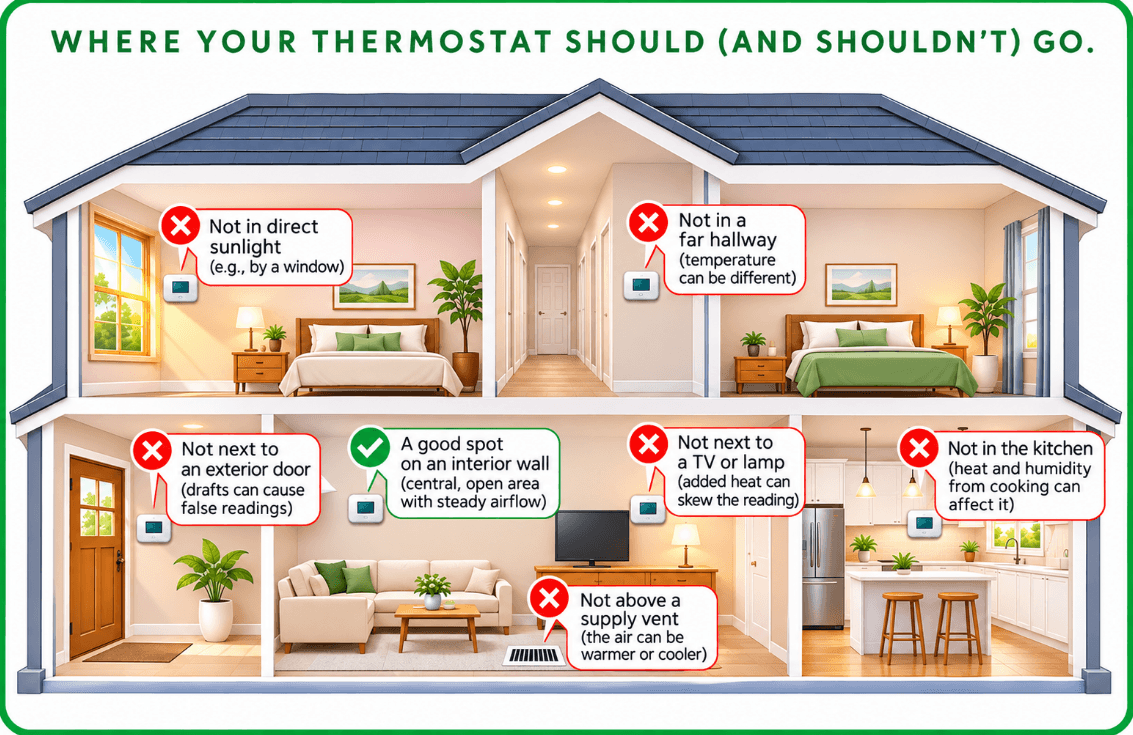
The U.S. Department of Energy's Energy Saver thermostat guidance recommends an interior wall away from direct sunlight, drafts, doorways, skylights, and windows.
How Do You Test If Your Thermostat Is Accurate?
The only way to know if a thermostat is inaccurate is to check it against a thermometer you trust. Put the two side by side for 15 minutes, then repeat the check a few times over the day. The pattern of the error is what tells you which fix will work.
Pick a thermometer you trust. If it has a probe, dip it in ice water first. An accurate one reads 32°F.
Tape it to the wall beside the thermostat at the same height, out of direct sun and vent airflow.
Wait at least 15 minutes.
Log your readings in the morning, mid-afternoon, and evening, plus once while the system is running.
Compare the gap. A difference of 1°F or less is normal. A steady gap of 2°F or more is worth correcting.
Your 24-hour thermostat log: Copy this into a notebook or print it out, then fill in a row at each check.
Gap = thermometer minus thermostat. A steady gap is the offset to enter.
Reading your log: When all four gaps land within about 1°F of each other, the error is steady. When they spread 2°F or more, the error is drifting, and the fix is the location rather than an offset.
Normal tolerance: Honeywell Home's T10 Pro product data sheet rates that thermostat's sensor at ±1.5°F at 70°F.
Field note: David Clark, who reviewed this guide, put it this way in Filterbuy's humidity measurement guide: "I carry a reference meter on service calls, and the analog dials surprise people. A wall dial that has hung in one spot for five years is usually still reporting the room it saw when it was new."
Steady or Drifting: What Do Your Results Mean?
A steady error, the same size all day, is a calibration problem that an offset can fix. A drifting error, one that grows with afternoon sun or cold wind, is a location problem.
Filterbuy's take: Save the offset for last. Picture a thermostat that reads 4°F high at 3 p.m. but correctly at 9 p.m.: a −4°F offset fixes the afternoon and breaks the evening. Fix the location first, then offset whatever steady gap is left.
By the numbers: Writing in Contracting Business, HVAC trainer Rob "Doc" Falke noted in A Peace Plan to End Thermostat Wars that exterior walls can run 3–8°F warmer or cooler than a building's core, and that direct sunlight can heat indoor surfaces above 100°F, even in winter.
How Do You Calibrate a Thermostat's Temperature Offset?
A temperature offset tells the thermostat to add or subtract a fixed number of degrees from what its sensor reads. Use one rule: the offset equals the thermometer reading minus the thermostat reading. If the thermostat shows 75°F and the thermometer shows 72°F, enter 72 − 75 = −3°F.
Menu names vary by model and firmware. Check your manual before changing installer settings.
Honeywell's ElitePRO installation guide allows display offsets of up to 3°F either way. Recheck it against your thermometer the next day.
How Do You Stop a Draft Behind Your Thermostat?
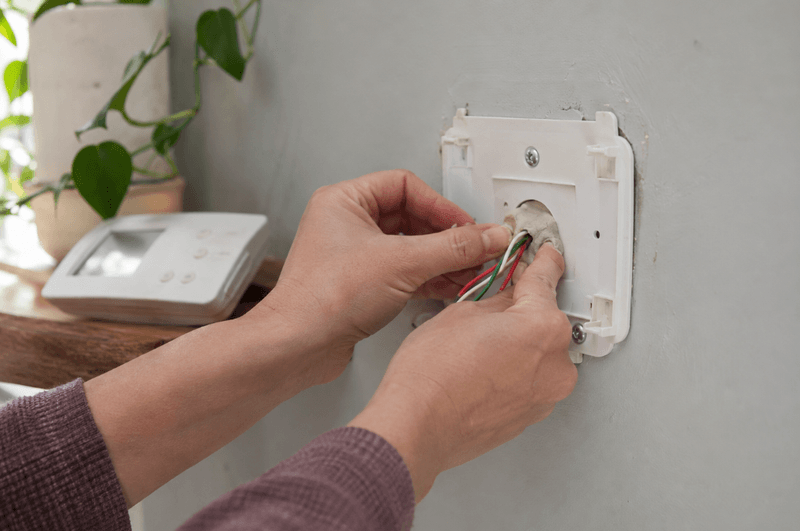
Installers often cut the wire hole behind a thermostat bigger than it needs to be. Air from inside the wall or the attic can then flow through the gap and across the sensor, which usually pulls the reading colder in winter. To seal it:
Turn off power to the heating and cooling system at the breaker or furnace switch.
Pull the thermostat off its wall plate. Photograph the wiring first, and leave the wires connected.
Pack the gap around the wires with plumber's putty or low-expansion foam sealant.
Reattach the thermostat and restore power, then retest after an hour.
Should You Move Your Thermostat?
If the error still drifts after sealing and an offset, the thermostat is probably in the wrong place. The best spot is a central interior wall in a room you use often, away from direct sun, supply vents, doorways, windows, kitchens, and electronics that give off heat.
Moving a wired thermostat means running new low-voltage wire through the wall, so it is usually a job for an HVAC technician. A wireless remote sensor is often the easier route. David Clark, President of Filterbuy HVAC Solutions, explains why in his thermostat guide: "Most thermostats can only sense temperature where they are physically located." Browse Filterbuy's smart thermostat guides for sensor-ready options.
Thermostat Says 72°F but the Room Feels Warmer?
Sometimes the thermostat is right and the room still feels warm at 72°F. Humidity is one reason, since humid air feels warmer than its temperature suggests because sweat evaporates more slowly. The EPA's Care for Your Air guide recommends keeping indoor humidity between 30% and 50%, and our humidity measurement guide shows how to check yours with an inexpensive hygrometer.
Airflow is the other half. HVAC Solutions technicians regularly find vents blocked by furniture on service calls, and a clogged air filter chokes the air reaching every room. Either problem leaves distant rooms lagging behind the setpoint while the hallway by the thermostat feels fine.
Filters are what we know best. Filterbuy has made air filters in U.S. plants it owns since 2013, and we cut each one slightly under its nominal size so it seats snugly, because air that slips around a loose filter goes unfiltered. A monthly filter check catches the rest, and our guide to choosing the right air filter shows how to find your size among Filterbuy's 600+ standard and custom sizes.
Supporting Statistics
42% of home energy goes to space heating. According to the U.S. Energy Information Administration's 2020 Residential Energy Consumption Survey release, heating used 42% of residential energy.
Up to 10% a year rides on a few degrees. The U.S. Department of Energy says adjusting your thermostat by 7–10°F for 8 hours a day can save as much as 10% annually on heating and cooling costs.
20–30% of duct air can be lost. ENERGY STAR estimates that 20–30% of the air in a typical duct system escapes through leaks and poorly connected ducts.
When Should You Call an HVAC Technician?
Call a licensed technician if the reading jumps around even with fresh batteries, the system ignores the thermostat, the error survives both sealing and an offset, or you want the thermostat moved.
Frequently Asked Questions
How Far Off Can a Thermostat Be Before It Needs Fixing?
A reading within 1°F of an accurate thermometer is normal. A steady difference of 2°F or more is worth correcting with an offset.
Why Does My New Thermostat Read the Wrong Temperature?
New thermostats can read high for a little while as their electronics warm up and settle. An unsealed wire hole left over from the installation is the other usual cause, so give it a day and seal the hole before you test.
How Often Should I Check My Thermostat's Accuracy?
Once a year is enough for most homes, ideally at the start of heating or cooling season.
Can a Dirty Air Filter Make My Thermostat Read Wrong?
No. A filter doesn't change what the sensor reads, but a clogged one cuts airflow, so distant rooms can lag behind the setpoint.
Does Every Thermostat Have a Temperature Offset Setting?
No. Many digital and smart thermostats have one, but some don't. Without it, a wireless remote sensor or a new location is the fix.
Glossary
Temperature offset: A thermostat setting that adds or subtracts a fixed number of degrees from the sensor reading. Also called temperature correction, display offset, or calibration.
Wall-cavity draft: Air moving through the hollow space inside a wall that escapes through the thermostat's wire hole.
Remote sensor: A wireless temperature sensor that lets a smart thermostat read a different room.
Relative humidity (RH): The amount of moisture in the air compared with the most it can hold at that temperature.
Installer Setup (ISU): The advanced menu on Honeywell Home thermostats that holds the offset and system settings.
Sources
Honeywell Home T10 Pro Smart Thermostat product data (Resideo): sensor accuracy ±1.5°F at 70°F
Honeywell Home ElitePRO installation guide: Troubleshooting: display offsets up to 3°F
Contracting Business: A Peace Plan to End Thermostat Wars: wire-hole drafts, exterior-wall and sunlight temperature swings
U.S. EPA: Care for Your Air: indoor humidity 30–50%
U.S. EIA: 2020 Residential Energy Consumption Survey release (June 15, 2023): heating 42% of residential energy, air conditioning 9%
ENERGY STAR: Duct Sealing: 20–30% of duct air lost to leaks
U.S. Department of Energy, Energy Saver: Thermostats: thermostat placement; up to 10% yearly savings from setbacks