
Permanent Hold vs. Temporary Hold: What Your Thermostat Is Doing
November 11, 2026

A temporary hold ends on its own when your thermostat’s next scheduled period starts. A permanent hold keeps your chosen temperature until you cancel it. Use temporary holds for everyday tweaks and permanent holds for trips or unusual weeks. To clear either one, press Run, Run Schedule, or Cancel Hold.
- Temporary hold: lasts until the next schedule period, then clears itself.
- Permanent hold: has no end time and stays on until you turn it off.
Your thermostat decides how long your system runs, and runtime decides how fast your filter fills up. Take the quick quiz below to find your filter match.
Find your filter match
Not sure which MERV rating fits your home? Answer a few quick questions and we’ll match you to your filter.
Already know your filter size? Shop air filters at Filterbuy
TL;DR
A thermostat hold tells your thermostat to set its schedule aside and keep the temperature you chose. A temporary hold lasts until the next scheduled period starts (or a time you pick), and then your schedule takes over. A permanent hold on a thermostat stays put until you cancel it. Filterbuy recommends temporary holds for everyday tweaks and permanent holds for trips and unusual weeks. To clear either one, press Run, Run Schedule, or Cancel Hold, depending on your model.
Key Takeaways
A temporary hold, often shown as “Hold Until,” ends on its own. A permanent hold has no end time.
A forgotten permanent hold quietly cancels the nightly and away setbacks that make a programmable thermostat worth having.
When a thermostat seems stuck on hold, the usual cause is a default setting, an app routine, a keypad lock, or a missing schedule.
When you travel in winter, hold at least 55°F instead of turning the heat off.
Filterbuy’s tip: check for a forgotten hold every time you change your air filter.
Why an air filter maker is writing about thermostat holds: Your thermostat decides how long your system runs, and that runtime decides how fast your filter fills up. Filterbuy has made air filters in our own U.S. plants since 2013, and our Filterbuy HVAC Solutions technicians service the systems those filters protect.
What Does Hold Mean on a Thermostat?
“Hold” means your thermostat has paused its programmed schedule and is keeping a temperature you picked. The system still heats and cools normally, just toward the held temperature.
Filterbuy customers often ask us, “I never pressed Hold, so why does my thermostat say it?” On many models, simply tapping the up or down arrow starts a temporary hold.
What “Hold Until” means: When your screen shows “Hold Until” followed by a time, you’re looking at a temporary hold, and that time is when your schedule picks back up. On Honeywell touchscreen models, you can tap the message to change the end time or switch to a permanent hold (Alarm Grid).
Temporary Hold vs. Permanent Hold: The Key Difference
The real difference is how each hold ends. A temporary hold expires on its own, while a permanent hold lasts until someone cancels it (Lennox).
Which Hold Should You Use? A Quick Decision Guide
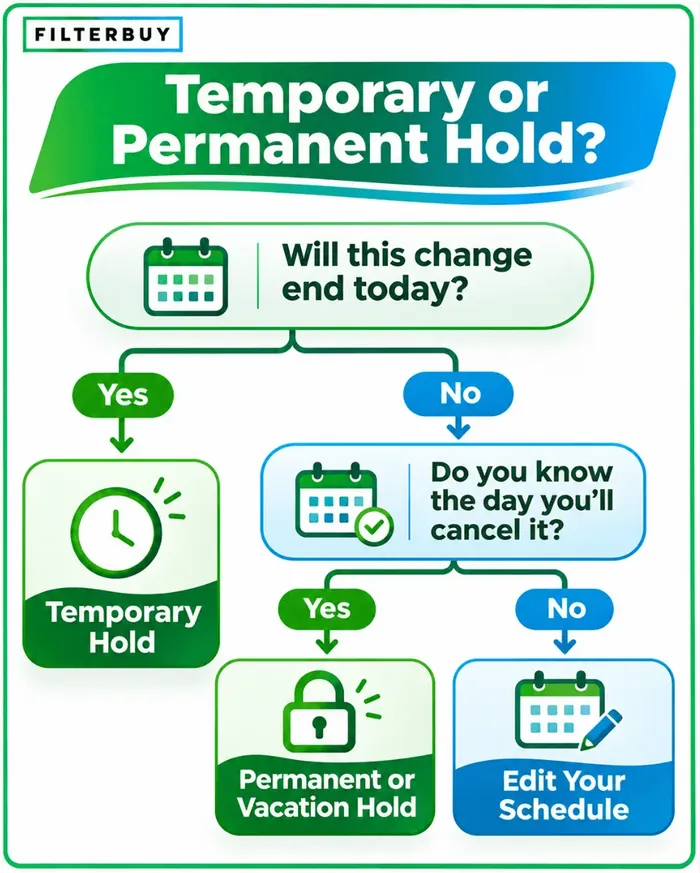
Reach for a temporary hold when the change should end today, and save permanent holds for when you already know the end date. Here’s the test we share with Filterbuy customers: if you can’t name the day you’ll turn the hold off, adjust your schedule instead.
Leaving for a winter trip? Leave the system on and hold at least 55°F. Filterbuy’s guide to winter thermostat settings when you’re away covers older homes and deep cold snaps.
Have a heat pump? Keep your setbacks modest. The U.S. Department of Energy advises against setting back a heat pump’s thermostat if it triggers the backup heat, since electric backup heat costs more to run (Energy.gov). Filterbuy’s heat pump winter prep guide has more.
How to Turn Off Hold on a Thermostat
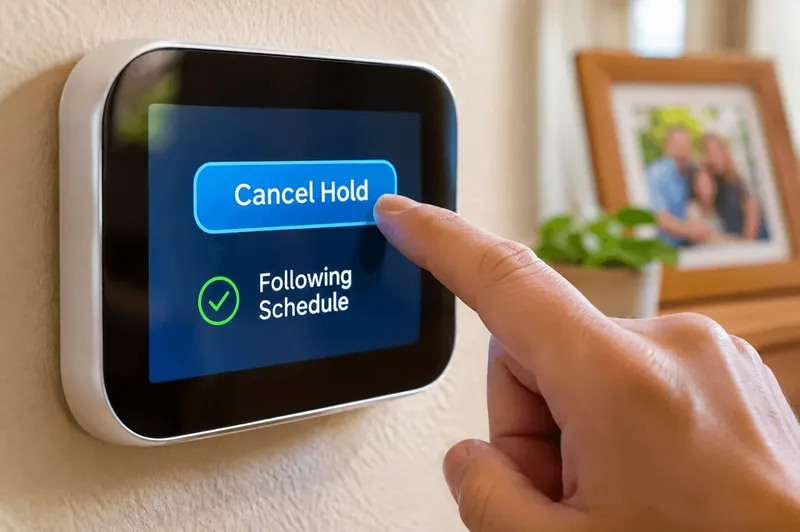
On most thermostats, you turn off hold by pressing the button that hands control back to the schedule. It’s usually labeled Run, Run Schedule, Resume, or Cancel Hold. Pressing the temperature arrows won’t clear a hold. It just starts a new one.
Sources: Honeywell Home, Alarm Grid, Google Nest Help, and Support.com support pages. Steps can vary by model and firmware.
Thermostat Stuck on Hold? 6 Common Causes and Fixes
A thermostat that won’t leave hold is rarely broken. Usually a setting, an app, or a missing schedule keeps bringing it back. Work through these checks in order:
There’s no schedule to return to. If the schedule was never set up, or was cleared, the thermostat has nothing to resume. Program a schedule first, then cancel the hold.
The default hold length is set to “indefinite.” On ecobee thermostats, a Hold Action of “Until I change it” turns every manual adjustment into a permanent hold. Switch it to “Until the next scheduled activity,” and future holds will end on their own (Smart Home Perfected).
An app or routine keeps setting it again. Geofencing, voice assistant routines, and smart home hubs can send a fresh hold every time they run (Smart Home Perfected). Check the thermostat app and connected platforms.
A utility energy program is adjusting it. If your smart thermostat is enrolled in a utility rewards program, your setpoint may shift briefly during peak-demand events. These end on their own.
The keypad is locked. A screen lock blocks Run and Cancel, so unlock it with your code or the app.
The thermostat needs a restart. Weak batteries or a power hiccup can freeze the display. Replace the batteries or restart it, and save a factory reset for last, since it erases your schedule.
When hold isn’t the real problem: Our filter-maker view helps here. If you’ve cleared the hold and your home still won’t reach the set temperature, check the air filter before you blame the thermostat. A clogged air filter restricts airflow, so the system struggles and the house can feel “stuck” at the wrong temperature. If a fresh filter doesn’t fix it, call a licensed HVAC technician.
The 60-Second Hold Audit
The Filterbuy team suggests pairing this quick check with every filter change, so neither gets forgotten.
Read the screen. “Hold,” “Permanent Hold,” or a hold bubble means the schedule is paused.
Look for an end time. If none is shown, the hold won’t end on its own.
Check the default hold length. Choose “until the next scheduled activity” if your settings include it.
Review app routines. Remove any that set a fixed temperature.
Pull the filter. Hold it against white paper, and if it looks gray, replace it.
Why a Forgotten Permanent Hold Raises Your Energy Bill
A forgotten permanent hold raises your energy bill because it switches off your schedule’s setbacks, and those add up. The U.S. Department of Energy says you can save as much as 10% a year on heating and cooling by turning your thermostat back 7°–10°F for 8 hours a day (Energy.gov).
We see the same pattern every heating season. A cold snap hits, someone sets a permanent hold at 72°F, and nobody remembers to cancel it. The furnace then works through every night and workday.
“A hold is one of the handiest buttons on a thermostat, and one of the easiest to forget. I think of it like a sticky note: great for today, but if it’s still there next week, the schedule needs a fix. Working alongside our manufacturing team taught me that runtime and filter life go hand in hand, so whenever I clear a hold after a trip, I check the filter too.”
Michelle Wan, Brand Manager & Air Quality Writer, Filterbuy
Pro Tip from the Filterbuy team: Pair your hold check with a filter check. We build filters for a living, and runtime is what loads them. Our guide to how often to change your air filter helps you set a schedule. If remembering is the hard part, Filterbuy auto-delivery ships your exact size right when it’s due.
Supporting Statistics
1. Half of thermostats in one study sat on hold
About 50% of photographed programmable thermostats were on “long term hold.”
In low-income homes, 85% of residents said they used programming. Yet 45% of their thermostats were on hold.
Why it matters: Forgotten holds are common.
Source: Lawrence Berkeley National Laboratory, “Usability of Residential Thermostats”, 2011.
2. Heating is 42% of home energy use
Space heating was the top home energy use in 2020, averaging $519 per household.
Why it matters: A hold left on all winter skips the biggest savings.
Source: U.S. Energy Information Administration, 2020 RECS, June 15, 2023.
3. About 1 in 60 insured homes files a water or freezing claim each year
The average claim was $15,400 (2019–2023).
Why it matters: Holding at least 55°F on a winter trip costs far less than a burst pipe.
Source: Insurance Information Institute (Triple-I), based on ISO data.
Frequently Asked Questions
Is a permanent hold on a thermostat bad for my HVAC system?
No, it won’t harm your furnace or AC. The real cost is the energy-saving setbacks it skips.
How long does a temporary hold last?
Most temporary holds end at the next scheduled period. On some Honeywell thermostats, a temporary hold lasts less than 12 hours (Alarm Grid), while Nest holds can run up to 24 hours and ecobee lets you pick 2 or 4 hours.
Does a hold change my heat or cool mode?
No. A hold only locks the temperature within your current mode, so confirm it’s set to Heat or Cool as seasons change (Lennox).
How do I turn off a permanent hold on a thermostat?
Press Run, Run Schedule, or Cancel Hold, or tap the X on an ecobee hold bubble. On a Nest Thermostat, open the Google Home app and tap End hold.
What temperature should I hold when I travel in winter?
Hold at least 55°F, the American Red Cross minimum for an empty home in cold weather, and keep the heat on.