
Honeywell Thermostat Not Working? Troubleshooting by Symptom
November 25, 2026
Fix a Honeywell thermostat in order: start with the steps that erase nothing. Restart it, check the furnace side, and save the factory reset for last.
A factory reset means setting the thermostat up again. And it can't fix an unlatched furnace door or a clogged filter. Working in this order saves you a setup you didn't need.
Use the fix ladder below. Then take the match quiz, or shop air filters at Filterbuy.
The Honeywell fix ladder
Climb one step at a time. Stop when it works.
Erases nothing
Erases your setup
Restart it
Pull the faceplate off for 30 seconds. Reattach it and give it 2 minutes.
Takes batteries? Put in fresh AA alkalines.
Erases nothing
Check the system side
- Furnace door latched
- Breaker and furnace switch on
- Air filter lets light through
- Wi-Fi: a 2.4 GHz network with its own name (T9 and T10 also work on 5 GHz)
Erases nothing
Factory reset
Write these down first:
- Model number (plus the Date Code on a T10)
- System type and stages
- Schedule and Wi-Fi password
Each model has its own path. There's no universal reset button.
Erases your setup
Replace it if
- It runs on batteries but not on system power, even after step 2 checks out
- A T6 Pro shows alert code 170 (memory) or 173 (internal sensor)
Still offline at step 2? Check the IP address in the thermostat's Wi-Fi menu. A 169.254.x.x or 0.0.0.0 address means it reaches the router but not the internet, so contact your internet provider.
Safety first: Turn off the breaker before you touch thermostat wiring. Stop and call a pro if you see thick wires or a 120V or 240V label.
Filterbuy guidance built from Honeywell Home support articles and user guides. Filterbuy isn't affiliated with Honeywell or Resideo.
Filter failed the light test? Get the right one.
The filter is one of the few step 2 checks you can fix in minutes. Answer a few quick questions and we'll match you to the right filter for your home.
Already know your size?
TL;DR
Honeywell thermostat not working? Start with what the screen shows. A blank display calls for power checks, and a flashing "Cool On" is a delay that clears within 5 minutes. Honeywell Home says "offline" in the Resideo app typically means a poor connection. If the display works but nothing runs, check the filter and HVAC system before replacing anything.
Key Takeaways
A blank screen means checking power first: batteries, breaker, furnace power switch and furnace door.
Most Honeywell Wi-Fi thermostats need a 2.4 GHz network. Honeywell Home lists only the T9 and T10 as 5 GHz compatible.
A clogged air filter can stop cooling, even when the thermostat works.
A flashing "Cool On" is normal for up to 5 minutes. Honeywell Home calls it compressor protection.
Write down your model number and settings before a factory reset, since it can erase your schedule and Wi-Fi.
Honeywell Thermostat Troubleshooting by Symptom
Honeywell thermostat troubleshooting works best when you start from the symptom. Find yours in Filterbuy's symptom map below, then jump to that section. Turn off the breaker before touching thermostat wiring, and stop if you see thick wires or a 120V or 240V label.
Sources: Filterbuy symptom map, built from Honeywell Home support and Honeywell Home user guides.
Honeywell Thermostat Blank Screen
Honeywell Home's fixes for a Honeywell thermostat blank screen start with power. On C-wired models, Honeywell Home suggests a battery test. If batteries bring the screen back, the problem is on the system side, so check the breaker, the furnace power switch and the furnace door safety switch.
Batteries: if your model takes them, replace the thermostat batteries with fresh AA alkalines.
Breaker: reset any tripped HVAC breaker.
Furnace switch: make sure the power switch near the furnace or air handler is on.
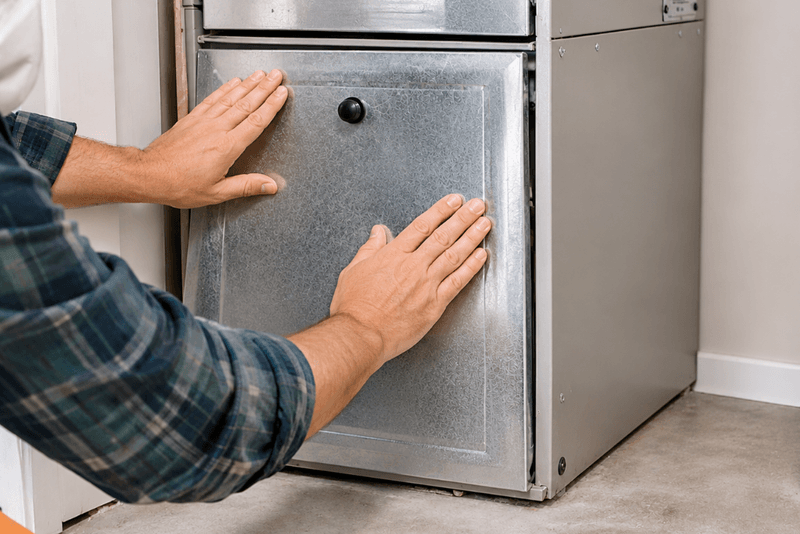
Furnace door: press the blower door fully closed. Filterbuy's blank thermostat screen guide flags this one after filter changes: a panel that doesn't latch leaves its safety switch open, cutting power to the furnace and thermostat.
Honeywell Thermostat "Cool On" Flashing
A flashing "Cool On" on a Honeywell thermostat means the compressor protection timer is running. After the compressor shuts off, the thermostat holds it off for a few minutes. Honeywell Home says to wait 5 minutes; once the delay ends, "Cool On" stops flashing and cooling begins.
If it flashes much longer, Honeywell Home says a contractor should check for a voltage problem or shorted wires. Filterbuy's guide to Wait and Cool On messages explains what restarts the timer.
Honeywell Thermostat Not Cooling
When a Honeywell thermostat isn't cooling, first confirm it's set to Cool, below room temperature. Then wait out any flashing delay, check the furnace door and breakers, look at the air filter, and confirm the Y and G wires are secure.
Work down Honeywell Home's cooling checklist, plus a filter check:
Mode and setpoint: Cool, set below the room reading.
Furnace door and power switch: door closed, switch on.
Breakers: both the indoor and outdoor unit breakers.
Air filter: try Filterbuy's light test, and replace the filter if no light passes through. Low airflow can freeze the indoor coil, as Filterbuy's AC not reaching set temperature guide explains; if you see ice, set the system to Off and the fan to On.
Wires: with the breaker off, make sure Y (compressor) and G (fan) are firmly seated.
Honeywell Thermostat Locked
A locked Honeywell thermostat has its screen or keypad lockout turned on. A partial lock usually allows temperature changes only; a full lock blocks everything. Many keypad models unlock with a four-digit code, and Honeywell Home lists "1234" as the default for the TH4110U2005 and TH4210U2002.
Keypad models (T4 Pro, FocusPRO, T6 Pro): press the button next to UNLOCK, enter each digit with + or –, and press Select.
Touchscreen models (T10, X8S): Honeywell Home's guides point you to Menu > Screen Lock or Security Settings.
No lock option in the menu: on the T6 Pro, an installer setting can hide it, so ask whoever set the lock.
Honeywell Smart Thermostat Not Connecting to Wi-Fi
When a Honeywell smart thermostat won't connect to Wi-Fi, Honeywell Home's troubleshooting starts with your network. Many Honeywell Home Wi-Fi thermostats work only on 2.4 GHz, so give that band a separate network name. During setup, keep your phone within 3–5 feet and connect to the main router, not an extender or guest network.
Work through Honeywell Home's Wi-Fi troubleshooting steps:
Restart the thermostat: pull the faceplate off for 30 seconds, reattach it and give it 2 minutes.
Split the bands: on a dual-band router, name each band separately. On a mesh system, turn off band steering, which moves devices between bands automatically.
Check the IP address in the thermostat's Wi-Fi menu. An address of 169.254.x.x or 0.0.0.0 means the thermostat can reach the router but not the internet, so ask your internet provider about DHCP, the setting that assigns network addresses.
Resideo App Thermostat Offline
A thermostat that shows offline in the Resideo app may still be online at the wall. Honeywell Home says the mismatch typically means a poor connection to its cloud service, which phone or router updates and overnight maintenance can cause. Update the app and your phone, then restart the router.
Still offline? Reinstall the app, which Honeywell Home says won't delete your account or devices.
How to Reset a Honeywell Thermostat
To reset a Honeywell thermostat, start with a simple restart: remove the faceplate for 30 seconds or swap the batteries. If that doesn't work, use your model's factory reset, since there's no universal reset button. A factory reset can erase your schedule, Wi-Fi and equipment settings.
Filterbuy's checklist before any factory reset: rule out the blower door first and, for Wi-Fi trouble, the IP address, since neither check erases anything. Then write down:
Model number, plus the Date Code on a T10, which Honeywell Home's reset steps ask for.
System type and number of stages, since setup asks for them again.
Your schedule and Wi-Fi password.
Filterbuy compares reset types in how to reset a thermostat.
Honeywell Thermostat Filter Reminder
A Honeywell thermostat filter reminder is a timer, not a sensor. On models like the T6 Pro, it counts calendar days or fan run time, as the installer set it. After you change the filter, clear the reminder so the timer starts over.
On the T6 Pro, codes 181 and 182 are filter reminders: open the menu, select ALRT and choose CLER, or snooze for 7 days. FocusPRO models clear with Select, then Dismiss, and touchscreen models reset the timer from the alert.
What Filterbuy watches from the filter side: a calendar-day reminder can't tell how hard your fan is working, so Filterbuy's thermostat fan Auto vs. On guide suggests monthly checks on On or Circulate.
"If your fan runs on On or Circulate, don't wait for the reminder. Pull the filter once a month and hold it up to a light." Michelle Wan, Brand Manager & Copywriter, Filterbuy
Set the interval with Filterbuy's guide on how often to change your air filter. For other brands, see how to reset the change-filter reminder on your thermostat.
When It Isn't the Thermostat
If the display works and shows "Cool On" or "Heat On" solid, but the equipment still doesn't run, the thermostat is calling and the system isn't answering. Honeywell Home's cooling checklist sends you to the furnace door, breakers and wiring next, then to an HVAC contractor if those checks don't fix it.
A clogged filter can starve the system of air, too. As the U.S. Department of Energy puts it:
"Clogged, dirty filters reduce the amount of airflow and significantly reduce a system's efficiency." (U.S. Department of Energy)
Signs the Thermostat Itself Has Failed
Sometimes the thermostat is the problem. Honeywell Home points to two signs:
It runs on batteries but not on system power, even after the breaker, switch and furnace door check out.
A T6 Pro shows alert code 173 or 170. Honeywell's T6 Pro guide ties these to sensor and memory failures that call for a new thermostat.
Before you buy one, see Filterbuy's thermostat replacement cost guide.
Filterbuy's point of view: we make air filters in our own U.S. plants, so we look at thermostat trouble from the furnace side. Honeywell Home's blank-screen checklists say to close the furnace door securely, and on many furnaces that's the panel you open to change a filter. So before Filterbuy blames the thermostat, we check the door and the filter.
Supporting Statistics
1. A Clean Filter Can Cut AC Energy Use by 5% to 15%
5% to 15% potential reduction in air conditioner energy use after replacing a dirty, clogged filter.
2. About 1 in 10 U.S. Homes Had a Smart Thermostat (2020)
12.8 million of 123.5 million U.S. homes had a smart or internet-connected thermostat.
Source: U.S. Energy Information Administration (EIA), 2020 RECS Table HC6.1
3. Smart Thermostats Save About 8% on Heating and Cooling
About 8% of heating and cooling bills, or $50 a year, on average for ENERGY STAR certified smart thermostats.
Frequently Asked Questions
Why Did My Honeywell Thermostat Go Blank After I Changed the Furnace Filter?
Check the blower door first. That panel presses a safety switch, and if it doesn't latch, power to the furnace and thermostat can cut out. Turn off the furnace, reseat the panel until both tabs latch, then restore power.
What Is the Default Code to Unlock a Honeywell Thermostat?
Honeywell Home lists "1234" as the default unlock code for the TH4110U2005 and TH4210U2002. Press the center button, enter each digit and press Select. If a landlord or installer set a different code, ask them for it.
Do Honeywell Thermostats Work With 5 GHz Wi-Fi?
Only some. Honeywell Home lists the T9 and T10 as 5 GHz compatible. Most other Honeywell Wi-Fi thermostats need a 2.4 GHz network, so give that band a separate name on a dual-band router.
Why Does My Honeywell Thermostat Work on Batteries but Not on Wired Power?
The system side isn't sending power. Check the HVAC breaker, the furnace power switch and the blower door. If all three check out and it still runs only on batteries, Honeywell Home says to call a technician.
How Often Should I Change the Filter When My Honeywell Thermostat Shows a Reminder?
Change it when the reminder appears, then match the timer to your filter. The U.S. Department of Energy suggests cleaning or replacing AC filters every month or two during cooling season. Filterbuy's guide says a 1-inch filter typically lasts 1 to 3 months.
Fix the Airflow, Too
With the thermostat working again, check the filter while you're at the furnace. Filterbuy's guide shows where the furnace filter is located by system type. Order Filterbuy filters by the size on your old filter's frame, and if it isn't listed, Filterbuy cuts custom sizes to the eighth of an inch. Find your air filter size
Glossary
Honeywell Home: the thermostat brand Resideo Technologies uses under license from Honeywell International Inc.
Resideo app: the app for setting up and controlling Honeywell Home Wi-Fi thermostats.
Compressor protection: a timer that briefly keeps the compressor off before it restarts.
C wire: the "common" wire that gives a thermostat constant 24-volt power.
Furnace door safety switch: cuts power to the furnace or air handler when the blower door is open.
2.4 GHz: the Wi-Fi band many Honeywell Home thermostats require.
Filterbuy makes HVAC air filters and isn't affiliated with or endorsed by Honeywell or Resideo Technologies, which makes Honeywell Home thermostats under license from Honeywell International Inc.